Bring-Your-Own Model Keys for Social Automation
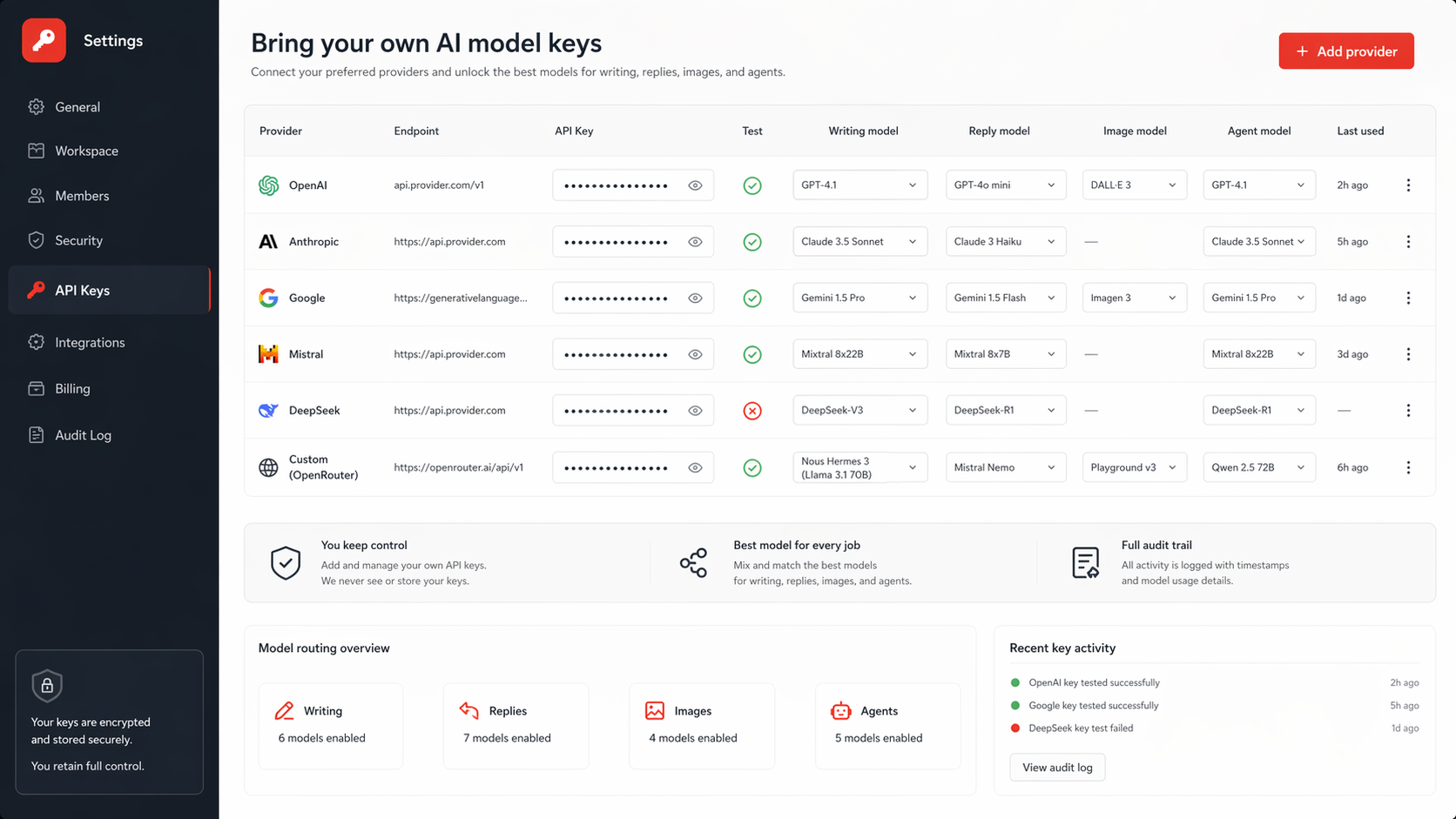
Definition: Bring-your-own model keys means each workspace can add provider endpoints and API keys, test them, and unlock only the models that key can actually use. The app should store secrets securely, mask them after save, prevent later extraction, and block model selection when no tested key exists.
Model choice is now part of the workflow. A team may want OpenAI for writing, Anthropic for long-form review, xAI for fast drafts, Google for low-cost variants, or a custom endpoint for an internal model. The hard part is not showing a dropdown. The hard part is making the dropdown honest.
SMM Agent separates app access keys from model provider keys because they solve different problems.
The misconception
The wrong settings page asks for one global API key and calls it done. That fails for agencies, teams, and operators because keys have different owners, scopes, budgets, rate limits, and model access.
The better settings page is a table:
- Provider
- Endpoint
- Hidden key field
- Test icon
- Error text under the key when testing fails
- Trash icon to remove the key
- Custom provider rows for additional endpoints
Why test state matters
A model should not be selectable for writing, replies, agents, tools, vision, or images unless the workspace has a tested key that unlocks it. This avoids a common product failure: users configure a workflow, choose a model, schedule a run, and discover the missing key only when the job fails.
OpenAI documents API credentials in its platform docs. OWASP's Secrets Management Cheat Sheet is also useful for the general principle that secrets need controlled storage, rotation, and limited exposure.
Old way vs new way
Old way: One text box. Save. Hope the model works later.
New way: Add provider row, enter endpoint and key, click test, see green or red icon, save only a masked reference, unlock available models, and never display the raw secret again.
Reality contact
Testing a key is not perfect proof. A provider can accept a lightweight request and still fail later because of rate limits, model-specific permissions, billing status, content policy, regional restrictions, or endpoint incompatibility.
The rollback is to treat the test as a gate, not a guarantee. The app should still log provider errors at runtime and mark a key unhealthy when repeated failures happen.
Secure behavior checklist
- Keep app API keys separate from model provider keys.
- Store provider keys per workspace.
- Encrypt or otherwise protect secrets at rest according to the deployment environment.
- Show only a masked value after save.
- Never return the full key to the browser after it is stored.
- Require re-entry to rotate a key.
- Test the key with the provider endpoint before unlocking models.
- Remove models from selection when the key is deleted or unhealthy.
- Let custom providers define endpoint, protocol, and model IDs.
Implementation map
- Built-in rows: OpenAI, Anthropic, Google, xAI, DeepSeek, Mistral, OpenRouter, and any provider the product supports directly.
- Custom rows: provider name, endpoint, protocol, key, model IDs, and test state.
- Model registry: maps providers to capabilities such as writing, replies, tools, vision, and image generation.
- Selection gate: the model picker reads active tested keys, not static provider marketing lists.
- Audit trail: created, tested, failed, rotated, and deleted events should be visible to admins.
Primary action
Build the provider key table before building advanced model routing. The table is the trust layer.
Secondary actions:
- Add custom endpoints after built-in provider rows work.
- Add model capability tags after key testing works.
- Add fallback routing only after runtime errors are logged clearly.
FAQ
What are bring-your-own model keys? They are user-supplied provider credentials that let a workspace use its own AI provider access inside the app.
Why does it matter? Teams control spend, model access, provider choice, and client-specific requirements.
How does it work? The user enters endpoint and key, tests the connection, and the app unlocks only models available through active tested keys.
What are the risks? Secret exposure, stale keys, false-positive tests, provider outages, model permission gaps, and unclear billing ownership.
Related pages
Model-key workflows live on SMM Agent and its dashboard. The product surface is ClawPoster and agencies can start from SMMClaw.
Conclusion
The tension is flexibility versus safety. Custom keys make the product more powerful, but every provider option becomes a security and reliability promise.
The uncomfortable part: a model picker without tested keys is not choice; it is a future support ticket.
Ready to automate your social posting?
Sign in to create, schedule, publish, and get help from the dashboard.
Start using SMM Agent